
Can AI keep everything the same and change only one small thing?
Last Updated: Feb 16, 2026
Answer
Short answer:
Yes, you can modify specific details of an image while keeping the rest of the scene exactly as it is. Rendair AI provides precision selection tools, such as a brush or lasso, that allow you to target a specific area for editing without affecting the surrounding architecture, lighting, or composition.
Overview
In professional architectural workflows, it is common to reach a point where the overall image is perfect, but a single detail, like a chair style, a material texture, or a background element, needs adjustment. Regenerating the entire image often results in a completely new variation, which can be frustrating if you lose the aspects you liked.
Rendair AI solves this through "inpainting" or targeted editing. This feature allows you to mask a specific region of your render or photograph. The AI then recalculates pixels only within that mask, blending the new content seamlessly into the existing perspective and lighting conditions.
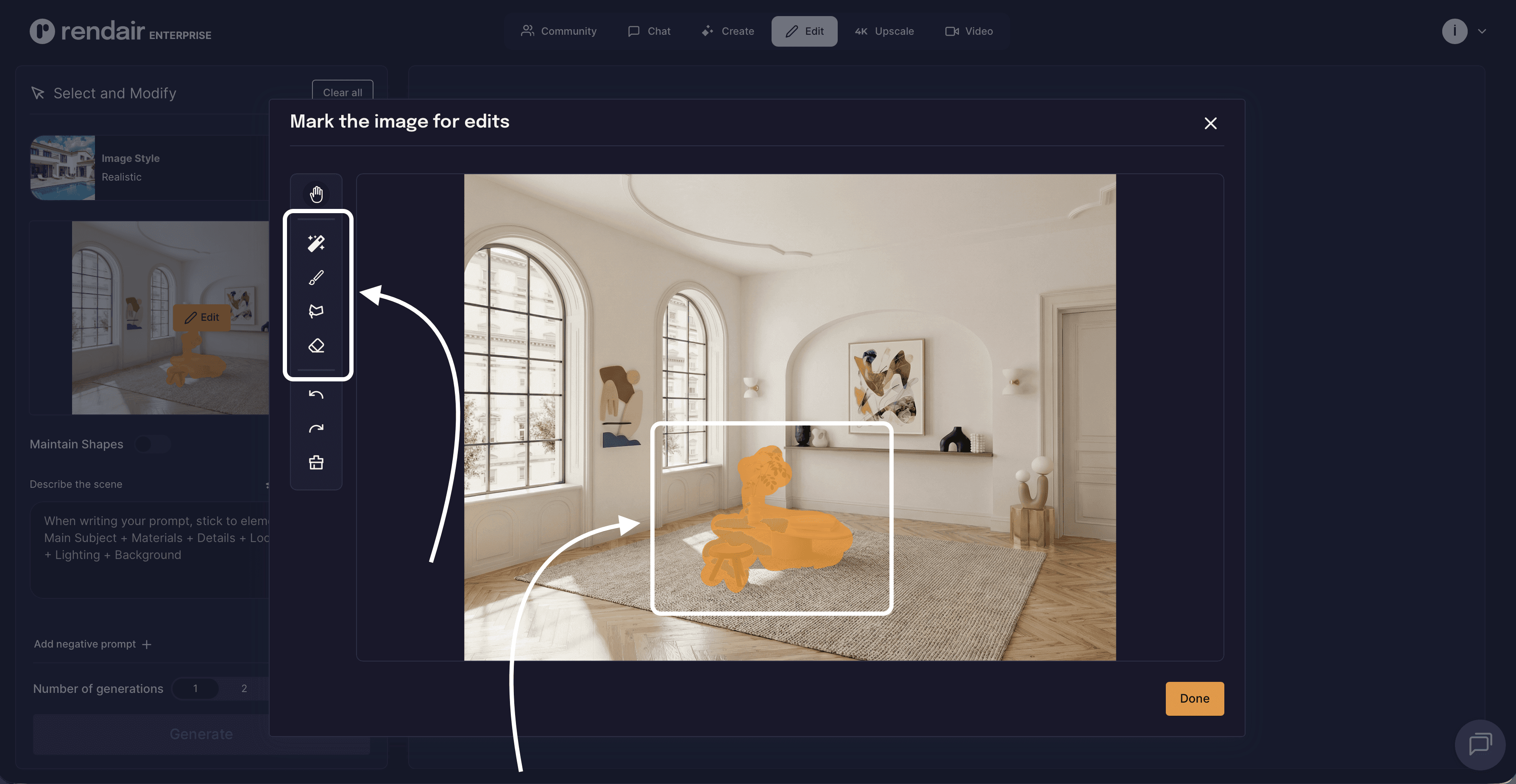
How it works
The process is designed to be intuitive, functioning similarly to masking tools in traditional photo editing software, but powered by generative AI.
Select the tool: Open your image in the editor (Select & Modify) and choose the selection tool (Brush or Lasso).
Highlight the area: Draw over the object you want to change, remove, or add.
Describe the change: Enter a text prompt describing what should appear in the selected area (e.g., "modern leather armchair" or "oak wood flooring").
Generate: The platform updates only the highlighted section, maintaining the integrity of the rest of the image.
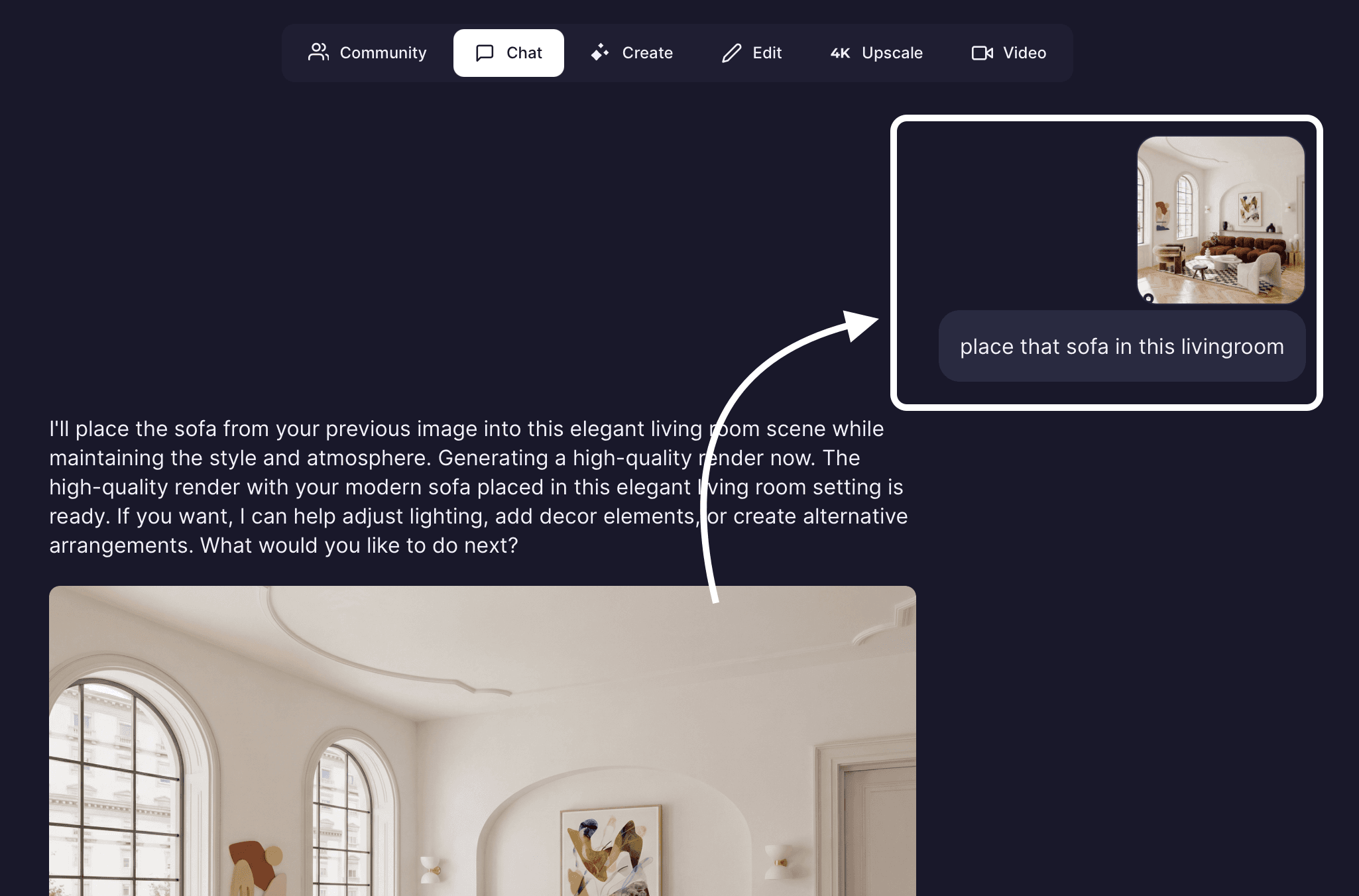
Or as an alternative to Edit Tab, you can partially edit images in Chat too.
Create a new Chat: Upload the image you would like to edit.
Describe the change: In the message, describe the portion of the image you want to change and how you want to change it. (e.g., “update flooring to black marble material” or “change sofa to green velvet fabric”).
Send the message: The chat will automatically choose the best available tool for you and make the necessary changes.
Capabilities
This workflow supports several critical design tasks:
Object replacement: Swap out furniture, light fixtures, or decor elements to test different design options.
Material swapping: Select surfaces like floors or walls to change materials (e.g., concrete to brick) while keeping the geometry intact.
Adding elements: Insert people, vegetation, or context into empty areas of a render.
Removing distractions: Erase unwanted elements, such as construction debris, stray artifacts, or cars blocking a view.
Correction: Fix small AI hallucinations or errors from a previous generation without restarting the process.
Inputs and outputs
Inputs
Source files: You can edit images generated within Rendair or upload your own base images (JPG, PNG, WEBP, TIFF, HEIC, AVIF).
Selection: Manual input via Brush or Lasso tools, or text description via Chat.
Outputs
Result: A modified image that retains the resolution and aspect ratio of the original base file.
Storage: All variations are saved automatically, and subscribers benefit from unlimited storage to keep every iteration.
When to use this
Client revisions: When a client approves the structure but requests different furniture or colors.
Staging: When you need to furnish an empty room photo without modeling the furniture in 3D.
Refinement: When a render is 90% perfect but requires minor cleanup or specific adjustments.
Limitations or notes
Selection accuracy: For the best blending results, ensure your selection covers the entire object plus a small margin of the background to help the AI understand the context.
Context awareness: The AI analyzes the surrounding pixels to match lighting and shadows. If the lighting in the base image is complex, the new object will attempt to respect those conditions.
Generative limits: While highly effective, AI may occasionally introduce unexpected elements. You can easily re-run the generation for the selected area until the result matches your intent.
Natural Language Edits: Chat models occasionally might change other parts of the image as well.
Do you have another question?
Search Our Knowledge Base…
Still Need Help?
Explore the platform's capabilities through a personalized demonstration or try it for free.
Contact support: support@rendair.ai
Documentation: Rendair Guides
Book A Demo: Book A Demo Session